
Let’s be honest: the way we manage projects has changed more in the last two years than it did in the previous twenty. If you’re a project manager, a team lead, or an agency owner, you’ve likely felt the shift. We’ve moved past the era of “digital” project management—where we simply moved sticky notes from one column to another on a screen—and entered the era of intelligent work.
In 2026, AI isn’t just a flashy add-on or a chatbot that summarizes your meetings. It has become the very foundation of how high-performing teams operate. But with so many tools claiming to be “AI-powered,” how do you separate the genuine game-changers from the over-hyped wrappers? At AI Project Management Tools, we believe in clarity over hype. Our mission is to help you find the tools that actually support human judgment, rather than trying to replace it.
What Exactly is an AI Project Management Tool?
Before we dive into the list, let’s clear up some jargon. An AI project management tool is software that uses machine learning and large language models (LLMs) to automate repetitive tasks, predict project risks, and optimize how your team spends its time.
Think of it as having a senior project coordinator who never sleeps. While you focus on the high-level strategy and stakeholder relationships, the AI handles the “work about work.” This includes:
* Automation: Generating tasks from meeting transcripts or emails.
* Risk Prediction: Flagging a project that is likely to miss its deadline based on historical data.
* Resource Optimization: Automatically balancing workloads so no one on your team is burning out.
* Forecasting: Providing realistic completion dates based on your team’s actual velocity, not just wishful thinking.
Key Benefits of Adopting AI in Your Workflow
Why bother making the switch? The benefits go far beyond just saving a few minutes here and there.
Eliminating the “Work About Work”
The average project manager spends nearly 60% of their day on coordination—status updates, chasing people for information, and manual data entry. AI tools can automate almost all of this. Imagine a world where your status reports write themselves and your standups are automatically summarized and distributed. That’s the reality in 2026.
Seeing Around Corners
One of the most powerful aspects of AI is its ability to spot patterns that humans might miss. By analyzing thousands of data points across your previous projects, these tools can identify “hidden” risks. If a specific type of task always takes 20% longer than estimated, the AI will tell you before you commit to a deadline.
Smarter Resource Allocation
We’ve all been there: one person is drowning in tasks while another is waiting for work. AI resource management software can look across your entire portfolio and suggest the most efficient way to distribute work. It’s about working smarter, not harder, and ensuring your team stays healthy and productive.
The Top 10 AI Project Management Tools for 2026
After extensive testing and research, here are our top picks for the most effective AI-driven project management platforms available today.
1. ClickUp (The All-in-One Powerhouse)
ClickUp has solidified its position as the most comprehensive “everything app” for work. In 2026, its ClickUp Brain feature is the gold standard for integrated AI. It doesn’t just answer questions; it understands the context of your entire workspace.
- Standout AI Features: AI Knowledge Manager (ask anything about your projects), AI Project Manager (automated status updates and subtask generation), and AI Writer for specialized content.
- Ideal Use Cases: SaaS startups, complex cross-functional teams, and agencies that want everything in one place.
- Pricing: Free plan available; AI features require an add-on starting at $5/user/month.
- Best for: Teams that want a single, powerful tool to replace multiple apps.
2. Asana (The Collaboration Leader)
Asana has always been known for its beautiful interface and ease of use. Their Asana Intelligence suite focuses on “human-centric AI,” helping teams stay aligned with their high-level goals.
- Standout AI Features: Smart Status (summarizes project progress in seconds), Smart Answers (natural language queries about project data), and Smart Summaries for long comment threads.
- Ideal Use Cases: Marketing agencies, design teams, and goal-oriented organizations.
- Pricing: Tiered pricing; AI features are included in Starter and Advanced plans.
- Best for: Teams that prioritize collaboration and clear goal-tracking.
3. Monday.com (The Customization King)
Monday.com is the ultimate “no-code” platform for work management. Their AI assistant is designed to help you build complex workflows without needing a degree in data science.
- Standout AI Features: Automated formula generation, AI-powered column suggestions, and an AI assistant that can summarize boards and suggest next steps.
- Ideal Use Cases: Operations teams, HR, and non-technical users who need highly customized boards.
- Pricing: Free for up to 2 users; AI features are rolling out across paid tiers.
- Best for: Organizations that need to build unique, custom workflows quickly.
4. Motion (The Intelligent Scheduler)
Motion is different from the others on this list. It’s not just a place to store tasks; it’s an AI that actively manages your calendar. If a meeting runs over or a new urgent task comes in, Motion automatically rebuilds your entire schedule.
- Standout AI Features: The “Intelligent Calendar” that prioritizes tasks and schedules them into your free time, and automated meeting booking.
- Ideal Use Cases: Busy executives, freelancers, and small teams who struggle with time management.
- Pricing: Individual and Team plans; no free version.
- Best for: Individuals and small teams who need an AI to tell them exactly what to work on next.
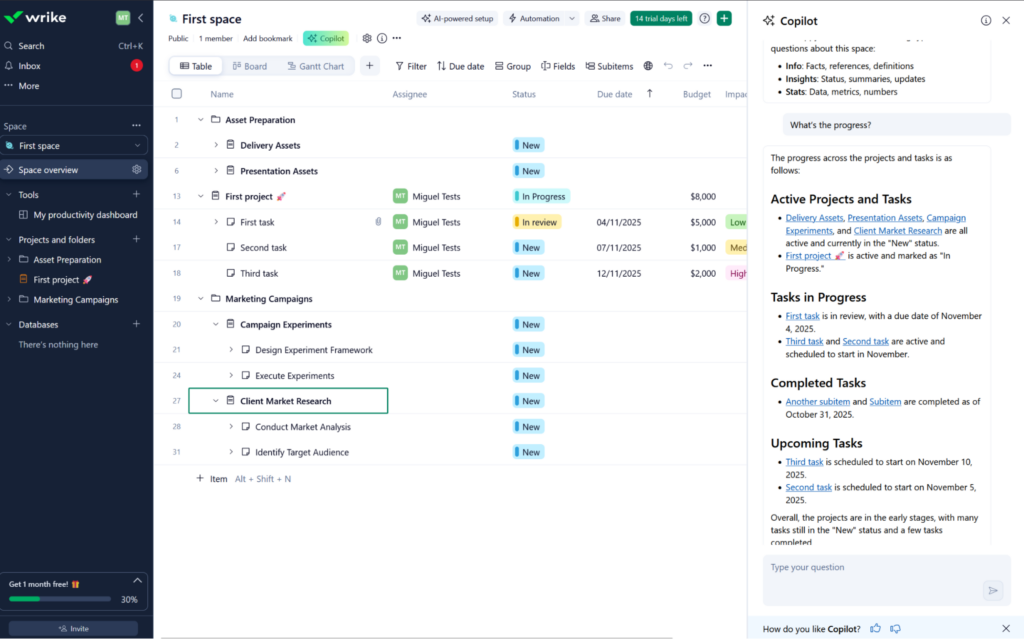
5. Wrike (The Enterprise Specialist)
Wrike is built for scale. Their Work Intelligence features are designed for large organizations with thousands of moving parts. It’s particularly strong at identifying bottlenecks before they become crises.
- Standout AI Features: Generative AI for task descriptions, advanced risk prediction models, and automated project subtask creation.
- Ideal Use Cases: Large enterprises, global PMOs, and complex manufacturing or IT projects.
- Pricing: Multiple tiers; AI features are prominent in Enterprise and Pinnacle plans.
- Best for: Large organizations that need enterprise-grade security and predictive analytics.
6. Taskade (The AI-First Workspace)
Taskade was one of the first tools to truly embrace AI agents. It’s a lightweight, incredibly fast workspace that feels like a second brain for your team.
- Standout AI Features: Custom AI Agents that can perform specific roles (like a “Scrum Master” agent), dynamic workflow generation, and AI-powered mind mapping.
- Ideal Use Cases: Solopreneurs, small creative teams, and remote-first startups.
- Pricing: Generous free tier; affordable paid plans for teams.
- Best for: Small, agile teams that want to experiment with autonomous AI agents.
7. Smartsheet (The Data-Driven Suite)
For those who love the power of a spreadsheet but need the features of a PM tool, Smartsheet is the answer. Their AI features focus on making sense of massive amounts of data.
- Standout AI Features: AI-powered data analysis (ask questions about your sheets), automated sheet building from natural language, and formula assistance.
- Ideal Use Cases: Finance, construction, and any project that involves heavy data tracking.
- Pricing: Pro, Business, and Enterprise tiers.
- Best for: Data-heavy industries that need robust reporting and automation.
8. Hive (The Productivity Platform)
Hive is built by users, for users. It’s a fast-moving platform that integrates deeply with your email and calendar. Their HiveMind AI is all about speed.
- Standout AI Features: Automated project templates, AI-assisted email drafting, and HiveMind for instant task creation.
- Ideal Use Cases: Fast-moving creative and marketing agencies.
- Pricing: Free for individuals; paid plans for teams.
- Best for: Agencies that need to move from “idea” to “execution” in record time.
9. Forecast (The Resource Expert)
Forecast is a specialized tool that focuses on the intersection of project management and resource planning. It’s the best tool for ensuring your agency is actually profitable.
- Standout AI Features: Automated time tracking, capacity forecasting, and AI-driven project budget tracking.
- Ideal Use Cases: Professional services, consulting firms, and agencies.
- Pricing: Focused on mid-market and enterprise; no free version.
- Best for: Service-based businesses that need to manage people and profits simultaneously.
10. Linear (The Developer’s Choice)
Linear has a cult following among software engineers for a reason: it’s incredibly fast and stays out of your way. Their AI features are subtly integrated to help developers stay in “the flow.”
- Standout AI Features: Automated issue triaging, “Magic” PR descriptions, and AI-powered search that understands intent.
- Ideal Use Cases: Software engineering squads and product-led startups.
- Pricing: Free for small teams; paid plans for growing companies.
- Best for: High-performance engineering teams who value speed and simplicity.
Comparison Table: Top AI PM Tools at a Glance
| Tool | Best For | Standout AI Feature | Free Plan? | Pricing Tier |
|---|---|---|---|---|
| ClickUp | All-in-One | ClickUp Brain | Yes | Mid-range |
| Asana | Collaboration | Smart Status Updates | Yes | Premium |
| Monday.com | Customization | AI Formula Builder | Yes | Mid-range |
| Motion | Scheduling | Intelligent Calendar | No | Premium |
| Wrike | Enterprise | Risk Prediction | Yes | Enterprise |
| Taskade | AI Agents | Custom AI Agents | Yes | Budget |
| Smartsheet | Data-Heavy | AI Data Analysis | No | Mid-range |
| Hive | Agencies | HiveMind Templates | Yes | Mid-range |
| Forecast | Resources | Capacity Forecasting | No | Enterprise |
| Linear | Developers | Issue Triaging | Yes | Mid-range |
Advanced AI Implementation Workflows: From Pilot to Scale
Adopting AI in project management isn’t just about flipping a switch; it’s about a structured transition. In 2026, the most successful organizations follow a “crawl-walk-run” implementation workflow:
- The Audit Phase: Before selecting a tool, conduct a “Work About Work” audit. Identify where your team spends the most time on manual coordination. Is it status reporting? Resource balancing? Meeting summaries?
- The Pilot Phase: Select a single, high-impact project to test your chosen AI tool. Focus on one specific feature, such as AI-driven risk prediction or automated task generation.
- The Data Integration Phase: AI is only as good as the data it consumes. Ensure your historical project data is clean and accessible. This is where tools like Smartsheet or Wrike excel, as they can ingest massive amounts of legacy data to train their predictive models.
- The Scaling Phase: Once the pilot is successful, roll out the tool to the wider organization. This is the stage where you appoint “AI Champions” within each department to lead the cultural shift.
Industry-Specific AI PM Use Cases
While the benefits of AI are universal, the application varies significantly across industries:
Construction & Engineering
In construction, AI is a literal lifesaver. Tools are now using computer vision to scan job sites for safety hazards and comparing 3D BIM models with real-world progress to identify design clashes before they become costly rework. Predictive risk management in construction now includes weather-adjusted scheduling, where the AI automatically shifts outdoor tasks based on hyper-local forecasts.
Healthcare & Life Sciences
For healthcare projects, compliance is the biggest hurdle. AI project management tools in this sector focus on automated regulatory tracking and audit-ready documentation. AI agents can monitor clinical trial timelines and automatically flag potential compliance breaches in real-time, ensuring that projects stay within strict legal frameworks.
Finance & Professional Services
In the world of finance, it’s all about the bottom line. AI tools like Forecast are used to manage complex resource capacity, ensuring that high-value consultants are never sitting idle. AI-driven budget forecasting can predict cost overruns with 95% accuracy by analyzing thousands of similar past projects.
Looking Ahead: Project Management Trends for 2027
As we move toward 2027, the landscape will shift from “AI as a tool” to “Agentic AI.” Here’s what to expect:
- The Rise of Agentic AI: We are moving beyond chatbots. In 2027, autonomous AI agents will manage entire workflows—from initial planning and resource allocation to final delivery—with minimal human intervention.
- Consultancies as Tech Firms: Major consulting firms are no longer just selling hours; they are selling proprietary AI platforms. The acquisition of AI startups by global consultancies (like AECOM’s acquisition of Consigli) is just the beginning.
- The AI Trust & Governance Standard: With the mandatory global professional standards for responsible AI use coming into effect, “AI Governance” will become a dedicated role within the PMO.
- Decision Intelligence: AI won’t just present data; it will recommend specific strategic actions. The project manager’s role will evolve into that of a “Human-AI Orchestrator,” focusing on the ethical and strategic implications of AI-driven recommendations.
How to Choose the Right AI Tool for Your Team
Choosing a tool isn’t just about the features; it’s about the fit. Here’s how we recommend evaluating your options:
- Team Size & Structure: A solopreneur needs Motion; a 500-person PMO needs Wrike. Don’t buy more complexity than you can manage.
- Existing Tech Stack: Does the tool integrate with where your team already lives? If you’re a heavy Slack or Jira user, make sure the integration is seamless.
- The “Human” Factor: How much training will your team need? Tools like Monday.com are very intuitive, while Smartsheet might require a bit more setup.
- Budget vs. Value: Don’t just look at the monthly cost. Consider the “cost of chaos”—how much money are you losing to missed deadlines and inefficient workflows?
Responsible AI: Ethics and the Human Element
At AI Project Management Tools, we believe that AI should be a co-pilot, not the pilot. As you adopt these tools, keep these three principles in mind:
- Transparency: Your team should always know when an AI is being used to make a decision or generate a report.
- Human Oversight: Never let an AI “fire” a task or change a deadline without a human reviewing it first. AI can hallucinate; humans provide the sanity check.
- Data Privacy: Ensure the tool you choose is SOC2 compliant and has clear policies on how your project data is used to train their models. Your intellectual property is your most valuable asset—protect it.
Frequently Asked Questions (FAQs)
What is “Agentic AI” in project management?
Agentic AI refers to autonomous systems that can perform complex tasks and manage entire workflows independently. Unlike traditional AI that requires constant prompting, agentic AI can set its own sub-goals to achieve a high-level objective, such as “optimize the Q3 resource plan for maximum profitability.”
How does AI help with project safety in construction?
AI uses computer vision and sensor data to monitor job sites in real-time. It can identify if workers are not wearing proper PPE, detect unauthorized personnel in high-risk zones, and predict potential structural failures by analyzing sensor data from the site.
Will I need a certification to manage AI projects?
By 2027, it is predicted that over 75% of project management roles will require some form of AI literacy or certification. Professional bodies like the APM and RICS are already integrating AI governance into their chartered standards.
Are there free AI project management tools?
Yes! Tools like ClickUp, Asana, and Taskade offer excellent free versions. However, keep in mind that the most advanced AI features (like predictive analytics or custom agents) are often reserved for paid tiers or add-ons.
Will AI replace project managers?
In short: No. AI is great at processing data and automating tasks, but it lacks empathy, leadership, and the ability to navigate complex office politics. The project manager of the future will be a “Human-AI Orchestrator”—someone who uses technology to amplify their human skills.
Is my project data safe with these tools?
Most major platforms (like Wrike, Smartsheet, and Asana) have enterprise-grade security. However, you should always check if the tool uses your data to train its public AI models. Look for “Opt-out” options or “Private AI” features.
How long does it take to implement AI in a team?
You can start using basic features (like AI summaries) in minutes. However, fully integrating AI into your resource planning or risk forecasting usually takes 3-6 months of consistent data input before the AI becomes truly accurate.
Conclusion: Building a Future-Ready Team
The transition to AI-powered project management isn’t something that will happen in the future—it’s happening right now. The teams that embrace these tools today will be the ones leading their industries in 2026.
But remember, the goal isn’t to find the “smartest” AI; it’s to find the tool that makes your team smarter. Start small, pick one tool that solves your biggest pain point (whether that’s scheduling, reporting, or resource planning), and iterate from there. The future of work is intelligent, but it’s still very much human.
Key Takeaways
- AI is a co-pilot: Use it to automate the “work about work” so you can focus on strategy.
- Predictive over Generative: The real value of AI in PM is risk prediction and forecasting, not just writing emails.
- Start with fit: Choose a tool based on your team size and existing workflow, not just the feature list.
- Ethics matter: Prioritize data privacy and human oversight in every automated workflow.